---
title: Creating Transaction Failed Alerts in saas•hapily
description: Learn how to set up alerts for failed Stripe transactions in HubSpot quickly and easily using saas•hapily, an essential tool from A8 Labs.
image: https://saas.hapily.com/hubfs/saas-sub2-3.png
---
[Skip to content](https://saas.hapily.com/blog/creating-transaction-failed-alerts-in-zaybra#main-content)
[](https://saas.hapily.com)
- [ Solutions ](https://saas.hapily.com)
- ## Roles
- [RevOps](https://saas.hapily.com/for-revops)
- [Marketing](https://saas.hapily.com/for-marketers)
- [Finance](https://saas.hapily.com/for-finance)
- [Customer Success](https://saas.hapily.com/for-customer-success)
- [Sales](https://saas.hapily.com/for-sales)
- [Engineering](https://saas.hapily.com/for-product-and-engineering)
- ## Industries
- [SaaS](https://saas.hapily.com/for-saas-companies)
- [Education](https://saas.hapily.com/for-trainings-and-education)
- [Non-Profits](https://saas.hapily.com/for-non-profits)
- [Memberships](https://saas.hapily.com/for-memberships)
- ## Get Started Today
Discover what you can do
when you harness the power
of Stripe data in HubSpot.
[](https://cta-redirect.hubspot.com/cta/redirect/23722838/96150f92-15c6-4c9d-9f8f-1874dd9fdc4f)
- [ Case Studies ](https://saas.hapily.com)
- [](https://www.zaybra.com/zaybra-customer-story-kinsta-product-led-growth)
Kinsta needed to see account status,
upgrades/downgrades, and growth.
saas•hapily provided the ideal solution.
- [](https://www.zaybra.com/zaybra-customer-story-shapeways)
Shapeways wanted a streamlined quoting
process in HubSpot. saas•hapily delivered.
- [ Pricing ](https://saas.hapily.com/pricing)
- [ Blog ](https://saas.hapily.com/blog)
- [ vs Commerce Hub ](https://saas.hapily.com/vs-commerce-hub)
[ Request a Demo
](https://www.zaybra.com#demo)
[ Stripe ](https://saas.hapily.com/blog/tag/stripe)
# Creating Transaction Failed Alerts in saas•hapily
Learn how to set up alerts for failed Stripe transactions in HubSpot quickly and easily using saas•hapily, an essential tool from A8 Labs.

Knowing when a customer’s transaction didn’t go as planned is an important part of keeping your revenue streams flowing. With saas•hapily (formerly Zaybra), you can set up automatic alerts in HubSpot when a Stripe transaction doesn’t go through. This guide explains how to create a simple “transaction failed” workflow.
## Building the workflow
Create a new, contact-based workflow. Start with a blank slate. 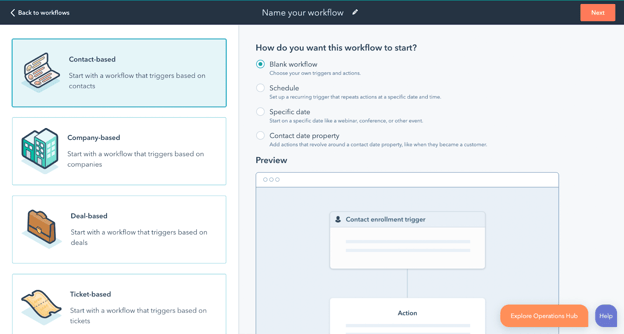
### Set the trigger
At the bottom of the list of possible triggers, select “saas•hapily: Transaction Failed.” This will tell the workflow to start every time a transaction in saas•hapily doesn’t go as planned.
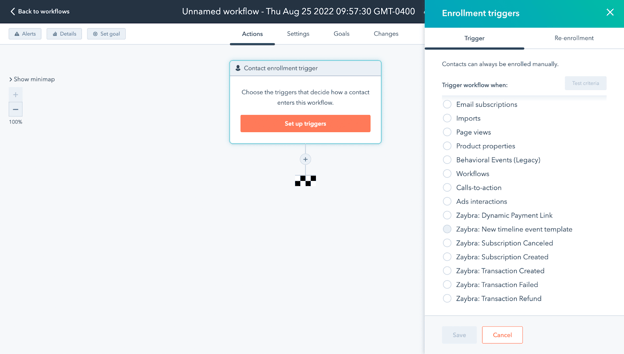
When you select this trigger, you’ll be prompted to choose occurrence dates. Set “Occured” to “is after” and enter today’s date. Then apply the filter. 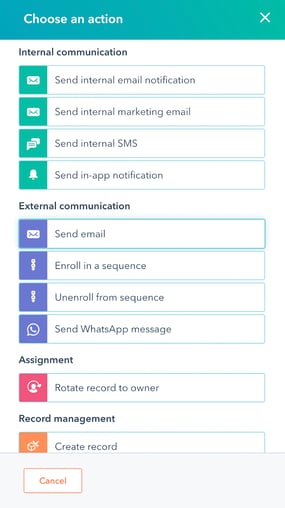
This will catch all instances from that day onward.
### Write your notification
Next, create a new action in the workflow. Select “Send in-app notification.”
You can now decide who will be notified, the subject of the notification, and the body text.
In addition to (or instead of) an in-app notification, you can also add an action for an internal email as another alert.
### Create a task
Now create a new action and select “Create task” under the “Record management” section. The next screen will allow you to set your task preferences.
## Turning on the workflow
When all your desired actions are set up, it’s time to turn on the workflow. Make sure you enable contact re-enrollment so all errors get caught regardless of whether a user has had an error before.
The final workflow should look something like the screenshot below.
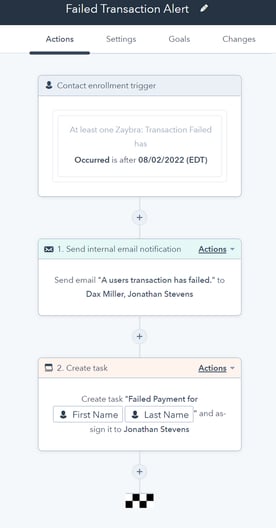
Watch the video below for a step-by-step guide.
Video Transcript
What’s up y’all, this is Dax Miller back at it again with a quick HubSpot hit. This time we’re gonna build out a quick easy workflow in HubSpot to get alerts when subscription payments failed in Stripe with our app Zaybra. So here at A8 Labs, we sell apps based on subscriptions in Stripe and it used to be a big pain to have to go in and make sure all the statuses were active and no one’s credit card kinda bounced or anything like that. What’s way better now is being able to get an alert or an email when that actually happens, almost in real-time. So now you get the power. Let’s go. Okay, first and foremost you gotta have our Stripe integration Zaybra installed, so go ahead and cop that from the ecosystem (link in description). Once that’s there, go ahead to your workflows and create contact-based workflow from scratch. We’ll name it Failed Transaction Oh No. Zaybra allows you to trigger workflows based on Stripe events. And one of those events is the transaction failed event. So we’re gonna have that, make sure it occurred, we’ll say after August first. So now any time a transaction fails after this time, basically any time in the future, this workflow is gonna pop off. So what are we gonna make it do? Let’s make it send an in-app notification to me and we’ll say failed transaction. Make the body, you know, we’ll have a little fun on it. We’ll say first name needs to get his/her/their life together. Alright, things happen. What else are we gonna do? We gotta let the IRS know. We’re gonna send an email. Internal email notifcation. Now let’s have some fun. Let’s do it this way. Internal marketing email. Tattletale at IRS dot gov. Now we’re getting the IRS involved so we know we’re getting paid. There it is. Gotta make sure you pick the email too. IRS wants you. So now that we have that, you want to review and publish. One of the key things here is make sure you enroll people only after the fact and for workflows like this you definitely want to allow re-enrollment. So any time we’re doing anything transaction-based, you make sure that people can get re-enrolled. So let’s save that. Turn it on. So we got this going, let’s jump over to Bo Jackson. Now we’ll try to use Zaybra to simulate Bo Jackson creating a failed transaction. So let’s just hit create Stripe transaction. Bo is going to try and purchase. These are our Stripe products. First, an Atari Lynx for a great price. Add product. He’s already got a saved payment method but it’s a failed payment method, so watch what happens. Oof, struggle bus. Boom, now we’ve got a transaction failed activity and we see our notification. Bo needs to get his/her/their life together. Now obviously that email went off to the IRS so you know it worked just fine. There you have it. A mega-easy way to get alerted when transactions fail in Stripe using Zaybra and HubSpot workflows. So check out Zaybra dot com, see more about the app. If you use HubSpot, you use Stripe, you gotta get it. But until the next video, peace.
### [ Jonathan Stevens](https://saas.hapily.com/blog/author/jonathan-stevens)
Jonathan is a Product Support Specialist at hapily. He helps professionals power up their HubSpot experience by supporting the most powerful apps in the HubSpot marketplace.
[ ](https://www.linkedin.com/in/jrs99/)
## Latest Articles
Browse Articles

#### Simplifying Tax Breakdown for Subscription Services Quotes
Learn the benefits of providing efficient tax breakdowns in quotes for subscription services. Enhance customer satisfaction and streamline ...

###### Sam Campbell
June 05, 2024
[ Stripe ](https://saas.hapily.com/blog/tag/stripe)

#### Organize Your SaaS Business: Managing Multiple Stripe Accounts
Discover why managing multiple Stripe accounts can help SaaS companies organize different services more effectively. Learn how this strateg...

###### Sam Campbell
June 05, 2024
[ Stripe ](https://saas.hapily.com/blog/tag/stripe)

#### Why Offering Multiple Payment Options Boosts Your Business
Learn about different payment methods, their benefits, and how they can expand your customer base. Explore insights on increasing conversio...

###### Nikki Zangardi
April 22, 2024
[ Stripe ](https://saas.hapily.com/blog/tag/stripe)
[](https://saas.hapily.com)
The easiest, most comprehensive way to manage your Stripe data and subscriptions in HubSpot CRM. Built [hapily](https://hapily.com).


### Let's Keep in Touch
###### saas•hapily
[Home](https://saas.hapily.com/)
[Customers](https://saas.hapily.com#customers)
[Features](https://saas.hapily.com#features)
[Testimonials](https://saas.hapily.com/#testimonials)
[Pricing](https://saas.hapily.com/pricing)
[Install Now](https://ecosystem.hubspot.com/marketplace/apps/sales/sales-enablement/zaybra-622453)
###### By Role
[RevOps](https://saas.hapily.com/for-revops)
[Sales](https://saas.hapily.com/for-sales)
[Marketing](https://saas.hapily.com/for-marketers)
[Finance](https://saas.hapily.com/for-finance)
[Customer Success](https://saas.hapily.com/for-customer-success)
###### Comparisons
[vs. Cartfuel](https://saas.hapily.com/blog/zaybra-vs.-cartfuel)
[vs. Chargebee](https://saas.hapily.com/blog/choosing-between-chargebee-and-zaybra)
[vs. Chartmogul](https://saas.hapily.com/blog/zaybra-vs.-chartmogul)
[vs. Commerce Hub](https://saas.hapily.com/vs-commerce-hub)
[vs. DepositFix](https://saas.hapily.com/blog/depositfix-vs-zaybra)
[vs. PayPal](https://saas.hapily.com/blog/why-paypal-doesnt-cut-it-on-hubspot-and-how-zaybra-changes-the-game)
[vs. Zapier](https://saas.hapily.com/blog/zaybra-vs-zapier)
###### Resources
[Blog](https://saas.hapily.com/blog)
[Knowledge Base](https://saas.hapily.com/docs)
[Security](https://saas.hapily.com/security)
[Feature Request](https://ideas.hapily.com/saashapily)
[App Marketplace Listing](https://ecosystem.hubspot.com/marketplace/apps/sales/sales-enablement/zaybra-622453)
[ ](https://www.linkedin.com/company/built-hapily/) [ ](https://www.youtube.com/@builthapily)
©2026 hapily. All Rights Reserved.
[Trust Center](http://trust.hapily.com) | [Privacy Policy](https://hapily.com/privacy?hsLang=en) | [Terms of Service](https://hapily.com/terms?hsLang=en) | [Security](https://www.zaybra.com/security) | [Cookies (yum!)](https://hapily.com/cookies?hsLang=en) | [Data Access Request ](https://app.termly.io/notify/63b59b6e-512c-482b-b39a-5e76d24025ff)
```json
{
"@context" : "https://schema.org",
"@type" : "BlogPosting",
"author" : {
"@type" : "Person",
"name" : "Jonathan Stevens",
"url" : "https://saas.hapily.com/blog/author/jonathan-stevens"
},
"dateModified" : "2024-04-25T18:54:00.725Z",
"datePublished" : "2023-03-31T03:22:19.000Z",
"headline" : "Creating Transaction Failed Alerts in saas•hapily",
"image" : [ "https://saas.hapily.com/hubfs/saas-sub2-3.png" ],
"mainEntityOfPage" : {
"@id" : "https://saas.hapily.com/blog/creating-transaction-failed-alerts-in-zaybra",
"@type" : "WebPage"
},
"publisher" : {
"@type" : "Organization",
"logo" : {
"@type" : "ImageObject",
"url" : "https://saas.hapily.com/hubfs/saas_hapily_wordmark_light_paleta.png"
},
"name" : "hapily"
}
}
```